
Vibe Coding vs AI-Assisted Coding: Understanding the Difference - And Why It Matters
You’ve probably heard the buzz: “I built an app in 20 minutes with AI!” Stories of non-developers shipping products overnight have taken the tech world by storm. And there’s real substance behind the hype — AI coding tools now help developers generate up to 55% of boilerplate code automatically, and adoption across engineering teams has grown by over 40% year-on-year.1
But beneath these success stories lies an important distinction that few people talk about: the difference between vibe coding and AI-assisted coding. Understanding this difference isn’t just semantics. It can mean the difference between a successful project and a frustrating dead-end.
The good news? The two approaches aren’t at war. The most effective practitioners use both — knowing when to vibe and when to architect. This post explains that spectrum, its hard limits, and how to navigate it wisely.
What Is Vibe Coding?
The term “vibe coding” was coined by Andrej Karpathy (former Tesla AI Director and OpenAI co-founder) in early 2024. Here’s his original description:
“There’s a new kind of coding I call ‘vibe coding’, where you fully give in to the vibes, embrace exponentials, and forget that the code even exists.”
In practice, vibe coding looks like this:
- You describe what you want in plain language
- The AI generates code
- You run it and see if it works
- If it doesn’t, you tell the AI “it’s broken, fix it”
- Repeat until it vibes (works)
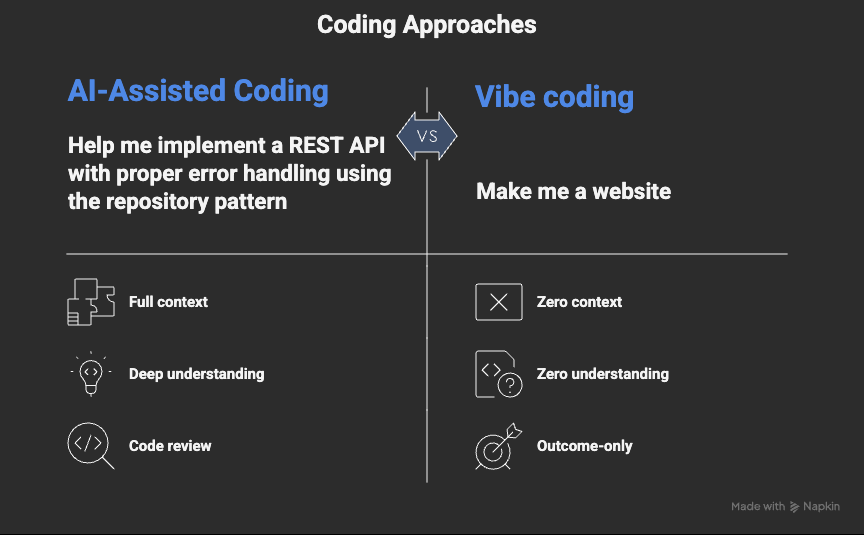
The key characteristic: you don’t need to understand the code. You’re judging purely by outcomes. Does the button work? Does the page look right? Ship it.
A Simple Analogy
Think of vibe coding like using a GPS navigation system. You tell it where you want to go, it gives you directions, and you follow them. You don’t need to understand how the GPS calculates routes, processes satellite signals, or handles traffic data. You just need to arrive at your destination.
What Is AI-Assisted Coding?
AI-assisted coding is fundamentally different. Here, the AI is a powerful tool, but you remain the architect.
In AI-assisted coding:
- You understand what you’re building and why
- You use AI to accelerate writing code, suggest solutions, or explain concepts
- You review and understand the generated code
- You modify, refactor, and integrate it thoughtfully
- You can debug and maintain the code independently
The key characteristic: the AI amplifies your abilities, but you maintain understanding and control. According to McKinsey, this model of “human-in-the-loop” AI usage produces the highest-impact productivity gains in software engineering.2
A Simple Analogy
AI-assisted coding is like using a calculator for complex math. You understand the mathematical principles, you know what calculation you need, and you use the tool to speed up the process. If the calculator gave you an obviously wrong answer, you’d notice immediately.
The Spectrum Between Them
These aren’t binary categories — they exist on a spectrum. Most developers using AI fall somewhere in the middle, and that’s perfectly fine. The important thing is knowing where you are on this spectrum, and whether that’s appropriate for your project.
How Each Approach Actually Unfolds
The difference becomes most visible when you look at the execution loop over time — not just the starting point.
Vibe Coding Loop (fast, fragile)
Prompt → Generate → Run → Broken? → Prompt again → Patch → Repeat
Works great at first. Degrades fast as complexity grows.
Debugging becomes guesswork. Changes break unknown things.
AI-Assisted Coding Loop (structured, sustainable)
Define goal → Generate scaffold → Review → Refine → Add tests → Validate → Integrate → Document
Slower start. Scales well. Maintainable long-term.
A Real-World Example: VideoPop.io
This pattern is common. Vibe coding gets you to “does this concept work?” quickly. AI-assisted coding gets you to “can this ship, scale, and be maintained?” The best teams use both — in sequence.
The Hard Limits of Vibe Coding
Here’s where we get real. Vibe coding has genuine value, but it hits walls — hard walls — that everyone should understand.
Limit #1: The Debugging Cliff
When vibe coding works, it feels like magic. When it breaks, you fall off a cliff.
The problem: If you don’t understand the code, you can’t debug it meaningfully. You’re limited to describing symptoms to the AI and hoping it understands the context. Hours become days.
Real-world scenario: Your AI-generated e-commerce checkout works perfectly — until a customer reports that orders with special characters in their address fail silently. Without understanding the code, you can’t trace the issue. “Fix the checkout bug” isn’t enough for the AI to work with.
Limit #2: The Context Window Ceiling
AI models have context limits. Once your project exceeds what the AI can “see” at once, vibe coding degrades rapidly.
- Small projects (a few files): AI maintains good context
- Medium projects (dozens of files): AI starts losing track
- Large projects (100+ files): AI can’t hold the full picture — fixes one thing, breaks three others
Limit #3: The Security Blind Spot
Vibe coding optimizes for “does it work?” not “is it secure?” Common AI-generated security issues include SQL injection vulnerabilities, exposed API keys, missing input validation, and insecure authentication flows. These are well-documented patterns in security audits of AI-generated codebases.3
Limit #4: The Maintenance Trap
Software isn’t just built — it’s maintained. Often for years. Frameworks update, dependencies change, requirements evolve. The AI that generated the original code doesn’t ‘remember’ it. If you never understood the code, maintaining it becomes a nightmare.
Limit #5: The Scaling Wall
Vibe-coded projects often work perfectly as prototypes but struggle to scale. No architectural planning, no performance considerations, no database query optimization. The AI gave you working code — not scalable code. And retrofitting scalability into a codebase you don’t understand? Nearly impossible.
Limit #6: The Integration Puzzle
Real-world software connects to databases, payment systems, third-party APIs, and authentication services. Each integration has nuances and edge cases. Vibe coding often produces code that works in isolation but fails mysteriously when integrated with real systems.
When Vibe Coding Actually Works
The Responsible Middle Path
The good news is you don’t have to choose one mode permanently. The smartest approach is knowing when to switch.
For Non-Developers
Accept the limits explicitly. Vibe coding can get you surprisingly far for personal projects and MVPs. But:
- Don’t handle sensitive data without professional review
- Don’t process payments without expert validation
- Have an exit strategy — know when to bring in a real developer
- Document everything — even if you don’t understand the code, document what it should do
For Developers
Use AI as a multiplier, not a replacement for thinking:
- Understand before accepting — Don’t blindly paste AI code. Read it.
- Test what’s generated — AI code often lacks edge case handling
- Maintain your fundamentals — Don’t let AI atrophy your core skills
- Be the architect — Let AI handle implementation details while you handle design
- Review for security — Always audit AI-generated code for vulnerabilities
For Teams and Companies
- Define what’s allowed — which projects can use heavy AI assistance?
- Require code review — AI-generated code needs human review like any other code
- Run security scanning — automated tools should catch obvious AI-generated vulnerabilities
- Set documentation requirements — understanding must be demonstrated, not assumed
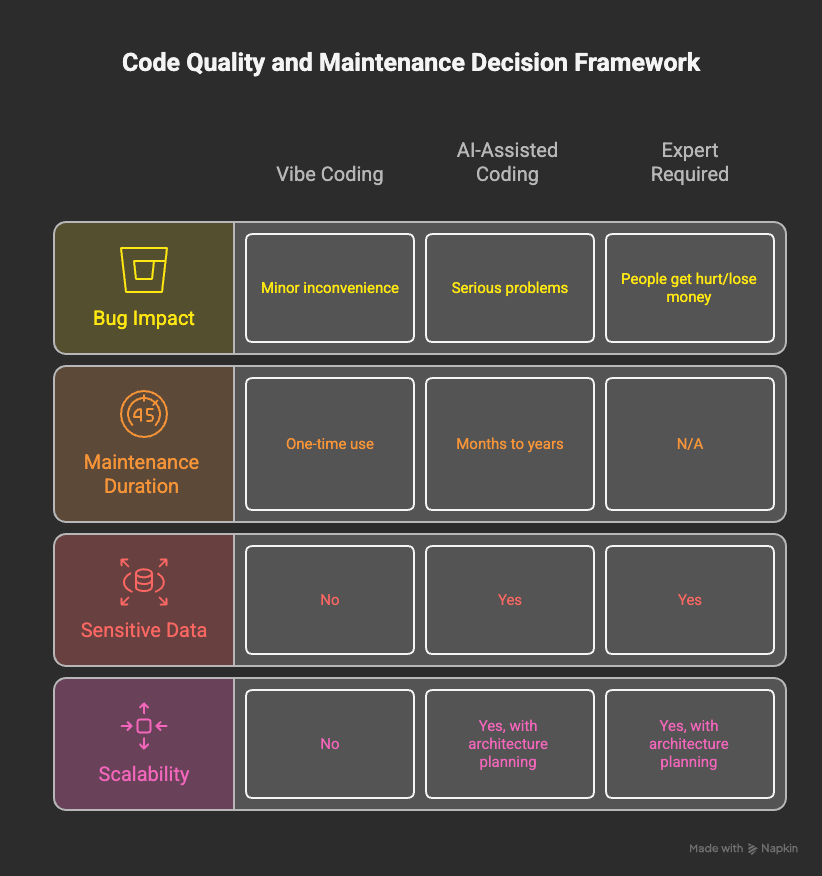
A Practical Decision Framework
Before starting any project with AI, ask yourself these four questions:
The Bottom Line
Vibe coding is powerful. It’s democratizing software creation in ways that were unimaginable five years ago. A small business owner can prototype their app idea. A marketer can build internal tools. A startup can validate a product concept like video-in-purchase-path in days instead of months.
But vibe coding has hard limits. Pretending otherwise leads to frustration, security vulnerabilities, unmaintainable codebases, and failed projects.
AI-assisted coding is the sustainable path for serious work. It combines the speed and capability of AI with the understanding and judgment of human expertise.
The best approach? Know where you are on the spectrum, and make sure it’s appropriate for what you’re building.
Key Takeaways
- Vibe coding = describing what you want, accepting AI output without deep understanding
- AI-assisted coding = using AI as a tool while maintaining understanding and control
- Vibe coding works for prototypes, personal tools, and throwaway scripts
- Vibe coding fails for production systems, security-critical apps, and long-term projects
- The debugging cliff is real — if you can’t understand it, you can’t fix it
- Context limits mean large projects will eventually outgrow pure vibe coding
- Security is invisible — working code isn’t automatically safe code
- Choose your approach consciously based on stakes, timeline, and requirements
Want to go deeper? This post is the first in a short series exploring how modern teams navigate AI-assisted development — from day-one prototyping to production architecture. Stay tuned.
References
1. GitHub, “GitHub Copilot Developer Survey,” 2023. github.com/features/copilot
2. McKinsey & Company, “The economic potential of generative AI,” June 2023. mckinsey.com
3. OWASP, “Top 10 for LLM Applications,” 2023–2024. owasp.org